A new cybersecurity campaign shows how attackers are skipping custom malware altogether and instead abusing trusted tools like Remote Monitoring and Management (RMM) software to gain long term access to victim systems. In this dual phase attack, hackers first steal email credentials through a phishing campaign, then use those logins to silently install and control LogMeIn RMM (Resolve) on the target machine, giving them a fully persistent backdoor.
This technique is especially dangerous because it abuses a tool that looks completely normal to most security software and helpdesk teams turning a trusted admin utility into a powerful attacker weapon.
How the attack works in two phases
Attackers are now using a two step method to compromise systems and stay hidden for as long as possible.
Phase 1: Stealing credentials with a fake invitation
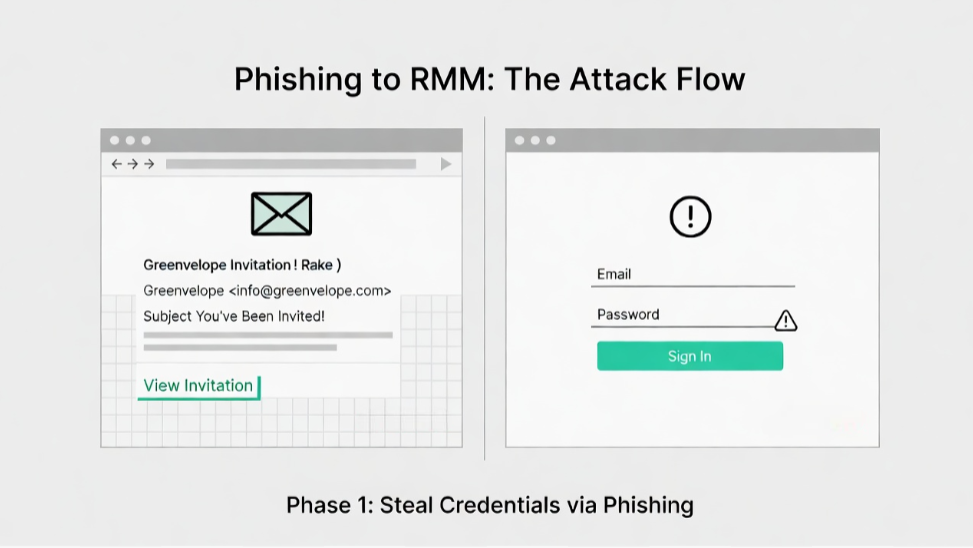
The attack starts with a carefully crafted phishing email that looks like a calendar or event invitation from Greenvelope, a real online invitation platform. The message encourages users to click a link to “view the invitation” or “RSVP.”
When the victim clicks, they land on a phishing page that mimics the login screen of Microsoft Outlook, Yahoo Mail, or AOL. The goal is simple: trick the user into entering their email address and password.
Once the attacker has these credentials, they own that account and can use it for the next phase establishing a foothold inside the network using a trusted RMM tool.
Phase 2: Turning RMM into a backdoor
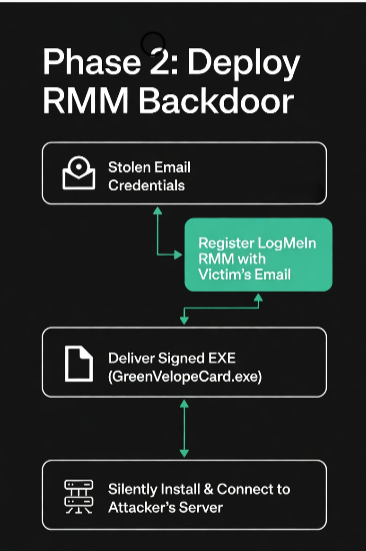
Instead of dropping a custom remote access trojan (RAT), the attackers now use the stolen email address to register for LogMeIn Resolve (an RMM product for IT and MSPs) under the victim’s identity. This lets them generate legitimate RMM access tokens.
They then deliver a second payload, usually an executable file named something like GreenVelopeCard.exe. This file is signed with a valid digital certificate, making it appear trustworthy to both users and some security tools.
Inside the executable is a JSON configuration that:
- Silently installs LogMeIn Resolve on the victim’s Windows machine.
- Connects it to an attacker‑controlled server URL, not the official LogMeIn cloud.
- Runs the RMM agent in the background, with few visible signs to the user.
How the attackers maintain persistence
Once LogMeIn Resolve is running on the infected machine, the attackers start “weaponizing” it turning a legitimate admin tool into a fully persistent backdoor.
Common techniques include:
- Changing RMM service settings so the agent runs with high privileges (SYSTEM level) on Windows, giving attackers full control.
- Creating hidden scheduled tasks that automatically restart the RMM service if the user or admin tries to stop or remove it.
- Disabling or bypassing antivirus by configuring the RMM tool to ignore or exclude itself from scans (if policy allows).
Because RMM tools are designed to have deep system access, they can:
- Run remote commands
- Move laterally across the network
- Dump credentials or steal files
- Install additional malware
Why this attack is so effective
This campaign is a textbook example of “living off the land” attackers don’t bring in exotic malware but instead reuse tools that are already trusted and allowed in the environment.
Key reasons this attack works so well:
- RMM tools are trusted: Most organizations allow and even encourage RMM agents for remote support, so they fly under the radar of firewalls and EDR tools.
- Signed binaries: The malware binary is code signed, making it look legitimate and harder for basic defenses to block.
- Slow detection: Since the RMM agent is always running, malicious activity can be spread out over time, making it hard to spot via logs or alerts alone.
KnowBe4 researchers call this a “skeleton key” attack once the attacker has valid credentials, they can unlock and control the environment using the very tools that are supposed to protect it.
How to defend against this kind of RMM abuse
Stopping this attack requires a mix of technical controls, user awareness, and better monitoring of RMM tools.
1. Tighten RMM and admin tool access
- Restrict RMM tools like LogMeIn, AnyDesk, or TeamViewer only to approved IT/MSP accounts, not general user accounts.
- Enforce multi factor authentication (MFA) on all accounts used to register or manage RMM solutions.
- Use least‑privilege access: RMM agents should run with the minimum permissions needed, not SYSTEM‑level by default.
2. Monitor for suspicious RMM behavior
- Look for unusual RMM installations outside of approved change windows.
- Monitor for RMM services connecting to unexpected or non official domains (e.g., not LogMeIn’s real cloud).
- Check for new, hidden scheduled tasks, especially those that automatically restart RMM services.
3. Train users to spot phishing
- Teach staff to recognize fake invitation emails and verify the sender before clicking any link.
- Use simulated phishing campaigns to reinforce safe habits around email links and logins.
- Warn users never to enter company or email passwords on sites that don’t use the organization’s official domain and MFA.
4. Assume compromise and limit impact
- Implement network segmentation so that a single infected RMM agent can’t easily move across the entire environment.
- Regularly audit user accounts, especially for signs of privilege escalation or new RMM registrations.
- Have a clear incident response plan for situations where a trusted admin tool is being misused by attackers.
What this means for your organization
This phishing campaign is a strong warning: attackers no longer need to build complex malware when they can instead misuse the tools that organizations already trust.
If your team uses RMM software like LogMeIn/GoTo Resolve, AnyDesk, TeamViewer, or similar tools, treat them as high risk assets and:
- Limit who can install and manage them
- Monitor their network connections and behavior
- Ensure strong MFA and conditional access policies are in place
A single stolen email credential can quickly turn a helpful admin tool into a full‑blown, persistent backdoor so preventing those initial credential thefts and closely watching RMM usage is critical for modern endpoint and email security.
Phishing attacks that abuse RMM tools like LogMeIn Resolve show how fast cyber threats are evolving and why every organisation must treat trusted tools as potential attack vectors. If you found this useful, do visit our other blog posts on our page under the tags AI, TECH, and CYBERSECURITY, where we break down the latest threats, defense strategies, and how to keep your team and systems secure in 2026 and beyond.